Bluetooth proxy
Extend Bluetooth coverage for nearby BLE devices.
An ESPHome Bluetooth proxy with an OLED climate and status display for Home Assistant.
Windows Manager 1.6.0
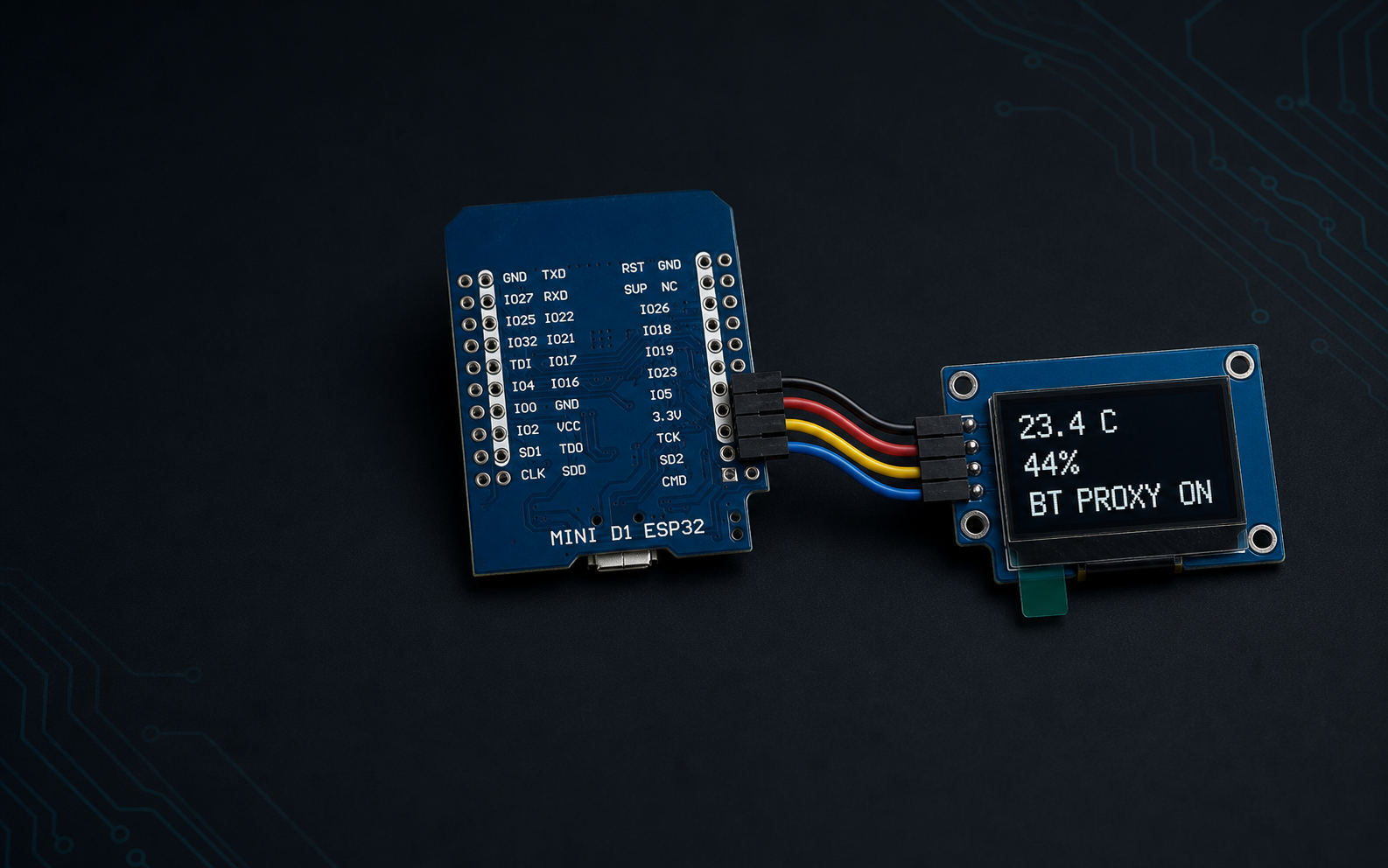
It turns an ESP32 and a small 128x64 OLED into a Bluetooth proxy with a live climate and status display. Control content, rotation, brightness, and OLED Care from Home Assistant, then maintain it with the desktop manager or ESPHome Device Builder.
Extend Bluetooth coverage for nearby BLE devices.
Choose Home Assistant temperature and humidity sources, with climate, single-value, and proxy views.
Choose display mode, normal or 180 degree rotation, brightness, and OLED Care without reflashing.
Pixel shifting and a full-panel refresh reduce long-running static patterns.
Check signal, IP, uptime, source, firmware, proxy state, and availability. A QR fallback portal handles first setup.
A blinking indicator and bottom-up tray announce panel and ESPHome updates without covering climate data.
01
HA Proxy Panel Manager 1.6.0 is a standalone Windows app. No Python installation is required, and ESPHome 2026.7.4 is bundled.
Windows may show SmartScreen because this community app is not code-signed. Compare its SHA256 with the value on the v1.6.0 release page.
Use Home Assistant OAuth with MFA or a manual token fallback. Tokens and device secrets are encrypted for your Windows account with DPAPI.
Detect USB devices, import a saved Windows Wi-Fi profile, download and verify the exact GitHub firmware commit, then follow the phone QR setup when needed.
Find panels through Home Assistant and mDNS, search the LAN, or connect directly by IP. Switching devices keeps the dashboard stable and readable.
Change display mode, rotation, brightness, and OLED Care. Run its animation, restart a panel, inspect entities and diagnostics, or prepare new sensor sources.
Install verified official firmware over Wi-Fi while preserving identity, sensor sources, display settings, encrypted or legacy API mode, and OTA configuration.
Transfer the matching API key securely, complete ESPHome discovery, and create protected Device Builder YAML without overwriting an unmanaged project.
02
The supplied configuration targets the exact AZ-Delivery MINI D1 ESP32 and ZHONG JING YUAN 1.29 inch CH1115 display listed below.
| Qty | Part | Identification | Size | Part code | Buy |
|---|---|---|---|---|---|
| 1 | AZ-Delivery ESP32 D1 Mini, USB-C | ESP-WROOM-32, CP2104, 4 MB | 39 x 31.5 mm | B0DHY5C3Q3 | Amazon.nl |
| 1 | ZHONG JING YUAN 1.29 inch PMOLED | 128x64 IIC, CH1115, white, 0x3C | 20 x 45.8 x 2.7 mm | CH1115-128x64DOT | AliExpress |
| 4 | Dupont wires, mixed kit | Female-to-female or female-to-male depending on soldered headers | 20 cm | B09KGRM98K | Amazon.nl |
| 1 | 5 V USB supply | Regulated 5 V, 2 A, USB-A, EU plug | Not applicable | B0FS1PLFBR | Amazon.nl |
Exact display specifications: ZHONG JING YUAN 1.29 inch PMOLED, CH1115 driver, monochrome white, 14.7 x 29.42 mm active area, 0.23 x 0.23 mm pixel pitch, 2.54 mm single-row connector, and -40 to 85 C operating range. ESPHome uses SH1106 128x64 compatibility mode for this module. Choose female-to-female or female-to-male Dupont wires to match the headers you solder. AZ-Delivery includes the correct USB cable with the ESP32, so no separate cable is required. Links were checked for the Netherlands on 9 August 2026 and are non-affiliate. Availability and revisions can change.
| OLED | ESP32 | Purpose |
|---|---|---|
| VCC | 3.3V | Display power |
| GND | GND | Ground |
| SDA | GPIO21 | I2C data |
| SCL | GPIO22 | I2C clock |
Power off before wiring. Use 3.3 V unless your OLED module documentation explicitly requires something else.
03
The Windows Manager is the easiest route. It guides the first USB flash, phone Wi-Fi setup, secure Home Assistant addition, and later updates over Wi-Fi.
Download version 1.6.0, connect the ESP32 with its supplied USB cable, and open the Install page. The app detects the serial adapter and fetches the verified firmware from GitHub.
Download for WindowsConnect Home Assistant, choose saved Wi-Fi details, name the panel, select climate entities, and flash. If Wi-Fi is not ready, scan the OLED QR and use the modern phone portal.
Follow first-time setupThe standalone Windows manager securely adds the discovered ESPHome device to Home Assistant. It can update a selected panel from GitHub and displays both project and Home Assistant ESPHome update status. Choose Add to Device Builder to create its exact maintainable YAML and namespaced secrets through protected Home Assistant ingress.
Read the Home Assistant guide04
Native display controls take effect without reflashing and persist after a restart. The Windows Manager exposes the same daily controls across every discovered panel.
The Wiki covers the Windows Manager, first-time setup, existing-panel updates, every device and firmware feature, Home Assistant and Device Builder, and troubleshooting.